





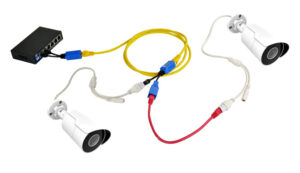
When installing CCTV cameras, one of the most common questions technicians ask is:
“Can I connect two IP cameras using a single Cat6 cable?”
The short answer is: Yes, but only in very specific situations.
In most professional installations, one Cat6 = one IP camera is the recommended industry standard.
This blog explains when it is safe, when it is not, and why—so you can design a reliable and future-proof CCTV system.
🔍
Why People Try to Use One Cat6 Cable for Two Cameras
The main reasons are:
-
Only one cable route is available
-
Reducing installation cost
-
Difficult to pull extra cables
-
Temporary CCTV setups
-
Trying to save time on retrofitting
But incorrect methods can cause video loss, power issues, and network failures.
✅
When It Is Recommended to Use One Cat6 Cable for Two IP Cameras
You can share one Cat6 cable only when you use supported and safe methods.
1. When Using a Dual PoE Splitter Designed for 2 Cameras
Some specialized PoE splitters take one PoE input and provide two isolated PoE outputs.
-
Safe for low-power cameras
-
No DIY cable cutting
-
Maintains data integrity
-
Best for distances below 30–40m
✔ Recommended for temporary or limited-space installations.
2. When Both Cameras Are Low-Bandwidth (2MP or Below)
If both cameras use:
-
H.265 codec
-
Low bitrate (1.5–2 Mbps)
-
Standard 1080p streams
Then one gigabit Cat6 cable can handle the data load.
✔ Works well for homes, small shops, warehouses.
3. For Temporary Events or Portable CCTV Installations
Events, exhibitions, festivals, or short-term monitoring setups can use one cable for two cameras.
✔ Good for quick installation
✘ Not suitable for long-term security systems
❌
When It Is Not Recommended to Use One Cat6 Cable for Two Cameras
1. Professional CCTV Installations (Home, Office, Shops, Apartments)
Industry-standard rule:
One Cable = One Camera
Why?
-
Ensures consistent bandwidth
-
Avoids packet loss during night vision
-
Stable PoE power delivery
-
Future upgrades become easy
❌ Splitting one cable is not recommended for permanent installations.
2. When Cameras Use PoE (Most Common Case)
PoE (802.3af / 802.3at) is designed for one device per cable.
Splitting cables manually causes:
-
Power drop
-
Heat build-up
-
Possible device damage
-
Unstable video stream
❌ Never use passive Y-splitters for PoE cameras.
3. When Distance Is Above 35–40 Meters
Long cables already suffer from:
-
Voltage drop
-
Resistance
-
Noise and interference
Sharing one cable doubles the problem.
❌ Expect video freezing or complete dropout.
4. For 4MP / 8MP / 12MP Cameras and Future Upgrading
Higher megapixels need:
-
More bandwidth
-
More stable power
-
Gigabit network support
If you split one Cat6, both cameras suffer.
❌ Not future-proof.
⚙️
Technical Explanation: Why Sharing Cable Causes Problems
A Cat6 cable has four twisted pairs.
-
IP cameras use all 4 pairs for Gigabit connection.
-
PoE uses the same pairs for power.
-
Splitting removes isolation and halves the capacity.
This results in:
-
Slower speeds
-
Loss of gigabit capability
-
High interference
-
Poor power delivery
That’s why professional standards (TIA/EIA) recommend:
One dedicated Cat6 cable per device.
🧠
Best Practice Recommendation
For a stable CCTV system:
🌟 Always run one Cat6 cable per IP camera.
Use dual-camera solutions only when:
-
Temporary setup
-
Short distance
-
Low megapixel cameras
-
Approved PoE splitters
This ensures high reliability and smooth video recording.